
cToast Notification Component
cToast is the core class in the VBMan framework for displaying message notification popups, providing a simple and elegant solution for message notifications.
✨ Core Features
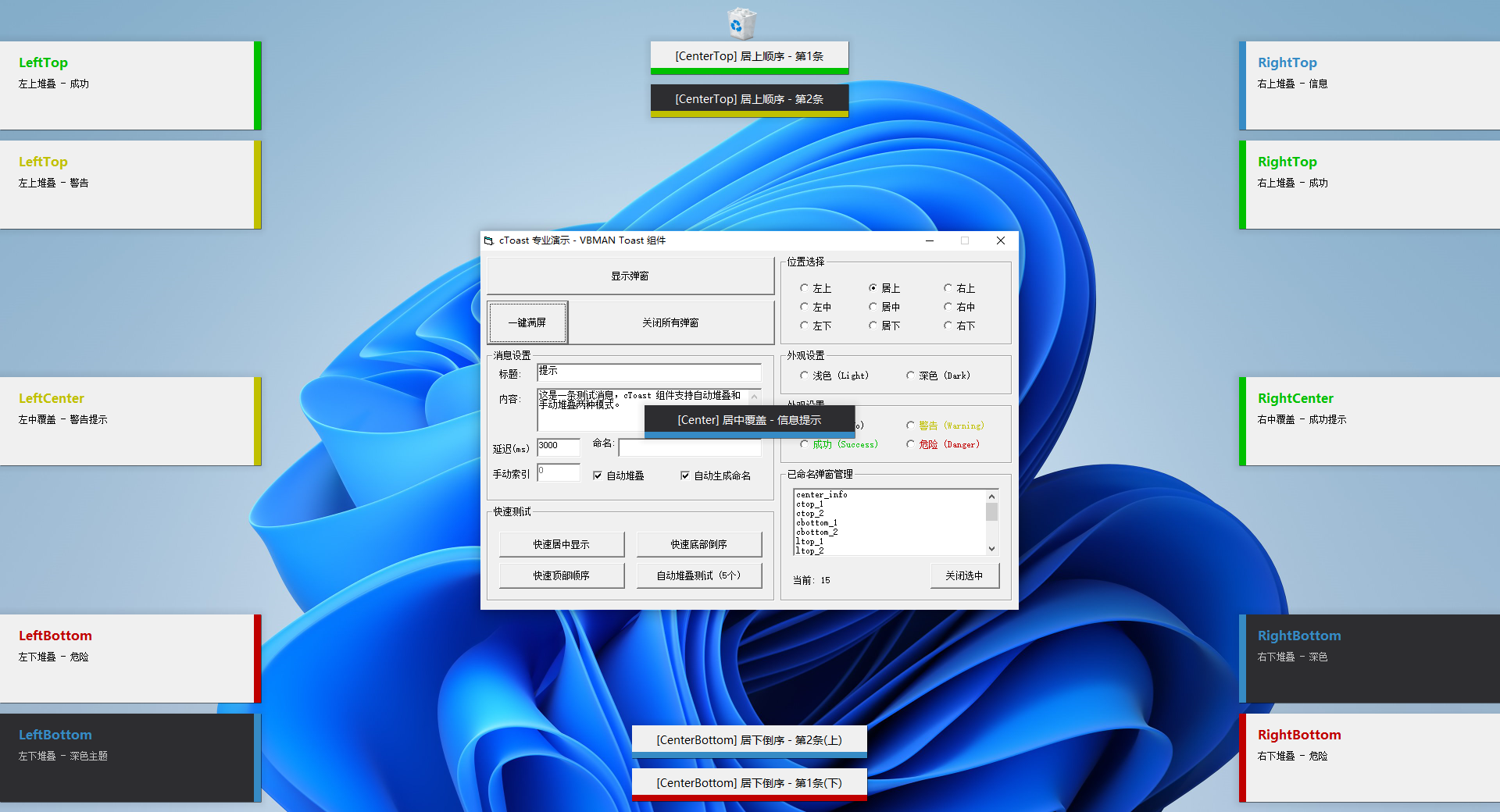
- 🎯 9 Display Positions: Support for center, four corners, four midpoints, and 9 different positions on screen
- 🎨 4 State Themes: Info, Success, Warning, Danger
- 🌓 2 Color Themes: Light, Dark
- 📦 Smart Stacking: Automatic sequential stacking or reverse stacking
- 🖱️ Mouse Hover Pause: Pause countdown on hover, resume on move away
- 🎭 Non-focus Window: Does not affect user's current operations
🚀 Quick Start
Global Singleton (Simplest Usage)
The VBMAN framework provides a global singleton object that can be called from anywhere without New:
vb
' Global singleton - call directly from anywhere
VBMAN.Toast.Show "Hello, greetings from anywhere"
This is the simplest way to use, no instance creation needed, perfect for quick notifications.
Simplest Usage
vb
' Default center display
With New cToast
    .Show "Operation successful!"
End With
Chain Call
vb
' Display success notification in top-right corner
With New cToast
    .Pos(RightTop).State(Success).Show "Saved successfully", 2000, "Notification"
End With
Auto Stacking
vb
' Auto stack multiple messages in top-right corner
With New cToast
    .Pos(RightTop)
    .State(Success).Show "First message", 0
    .State(Warning).Show "Second message", 0
    .State(Info).Show "Third message", 0
End With
📚 Documentation Navigation
- API Reference - Complete API methods, properties, and events documentation
- Examples - Example code for various usage scenarios
- Technical Details - Internal implementation principles and technical details
- FAQ - Frequently Asked Questions
🎯 Basic Concepts
Display Positions
cToast supports 9 preset display positions:
vb
' Left series
LeftTop      ' Top-left (stacking)
LeftCenter   ' Left-center (overlay)
LeftBottom   ' Bottom-left (stacking)

' Center series
CenterTop    ' Top-center (sequential stacking)
Center       ' Center (overlay)
CenterBottom ' Bottom-center (reverse stacking)

' Right series
RightTop     ' Top-right (stacking)
RightCenter  ' Right-center (overlay)
RightBottom  ' Bottom-right (stacking)
State Themes
vb
Info     ' Information (blue)
Success  ' Success (green)
Warning  ' Warning (yellow)
Danger   ' Danger (red)
Color Themes
vb
Light    ' Light theme (default)
Dark     ' Dark theme
💡 Common Patterns
1. Simple Notification
vb
' Information notification
With New cToast
    .Show "This is an information message"
End With

' Success notification
With New cToast
    .State(Success).Show "Operation successful!"
End With

' Error notification
With New cToast
    .State(Danger).Show "Operation failed, please try again"
End With
2. Persistent Display (No Auto Close)
vb
With New cToast
    .Pos(RightBottom).Show "Important Notice: Server maintenance scheduled for tonight 22:00", 0, "System Notification"
End With
3. Named Management
vb
Dim Toast As New cToast

' Name the popup
Toast.Tag("msg1").Pos(RightTop).Show "Message 1", 0

' Close specific popup by name
Toast.CloseMe "msg1"
4. Batch Management
vb
Dim Toast As New cToast

' Display multiple popups
Toast.Pos(RightTop).State(Success).Show "Success 1", 0
Toast.Pos(RightTop).State(Warning).Show "Warning 1", 0

' Check count
Debug.Print "Current popups: " & Toast.Count

' Close all popups
Toast.CloseAll
🎪 Form Types
cToast internally uses two different form implementations:
| Form Type | Used Position | Features |
|---|---|---|
| FToastCenter | Center, CenterTop, CenterBottom | Center display, bottom color bar |
| FToastDrawer | Other 6 positions | Side drawer style, side color bar + title and content |
🎨 Preview Effects
FToastCenter (Center Popup)
- Clean center display
- Bottom status color bar
- Suitable for important notifications and confirmations
FToastDrawer (Side Popup)
- Left or right side display
- Side status color bar
- Contains title and content lines
- Suitable for stacking multiple messages
🔗 Related Resources
- Source Location:
vbman/src/Toast/ - Demo Program:
vbman-demo/demos/Toast/ - Dependency Component:
cShadow(Shadow effect)
📝 Notes
- Center Position Does Not Support Stacking: Calling InstIndex on Center, LeftCenter, RightCenter positions has no effect
- Tag Uniqueness: Popups with the same TagName will not be created repeatedly
- Auto Stacking: When InstIndex is not manually called, the system will automatically stack
- Mouse Hover: Countdown pauses on hover, resumes after moving away
- Resource Release: Forms are automatically removed from the collection when unloaded
🤝 Community Support
- 💬 QQ Group: 915520648 Click to join