
WebSocket Development Guide
Table of Contents
Overview
WebSocket is a protocol for full-duplex communication over a single TCP connection. The new WebSocket library provides separated client and server implementations, supporting text and binary message transmission, with efficient buffer management and comprehensive error handling.
Key Features
- Separated Architecture - Independent implementations of client (
cWebSocketClient) and server (cWebSocketServer) - Protocol Support - Complete WebSocket protocol implementation (RFC 6455)
- Message Types - Supports both text and binary messages
- Frame Parser -
cWebSocketFrameclass dedicated to frame parsing and building - Efficient Buffering -
cByteBufferclass provides pre-allocation and auto-growth strategies - Event-driven - Handles all network events through event mechanism
- Broadcasting - Server supports broadcasting messages to all clients
Project Structure
Websocket/
念岸岸 Client/
岫   念岸岸 frmClient.frm      # Client form
岫   念岸岸 WsClient.vbp       # Client project
岫   弩岸岸 WsClient.vbw
念岸岸 Server/
岫   念岸岸 frmServer.frm      # Server form
岫   念岸岸 WsServer.vbp       # Server project
岫   弩岸岸 WsServer.vbw
弩岸岸 README.md              # Example description
Library Architecture
newWebsocket/
念岸岸 mWebSocketUtils.bas           # Common utility module (UTF-8, Base64, SHA1, enum definitions)
念岸岸 cByteBuffer.cls               # High-performance byte buffer: pre-allocation, auto-growth, minimal memory operations
念岸岸 cWebSocketFrame.cls           # WebSocket frame parser: read-only parsing, separated unmask operations
念岸岸 cWebSocketClient.cls          # WebSocket client
念岸岸 cWebSocketServer.cls          # WebSocket server
弩岸岸 cWebSocketServerClient.cls    # Server client connection information
Quick Start
Requirements
- Visual Basic 6.0 or higher
- VBMAN.dll library (located in
..\..\..\vbman\dist\DLL\)
Reference Library
- Open project
WsClient.vbporWsServer.vbp - Ensure
VBMANLIBlibrary is referenced - Check reference path:
..\..\..\vbman\dist\DLL\VBMAN.dll
Running the Example
Start Server
- Open
Server/WsServer.vbp - Run the project
- Click "Start Service" button
- Default listening port is 8080
- Open
Start Client
- Open
Client/WsClient.vbp - Run the project
- Enter server address
ws://127.0.0.1:8080 - Click "Connect" button
- Send messages after successful connection
- Open
Test Communication
- Enter a message in the client and click "Send"
- Server will echo the message
- Sending "broadcast" will trigger server broadcast functionality
WebSocket Client
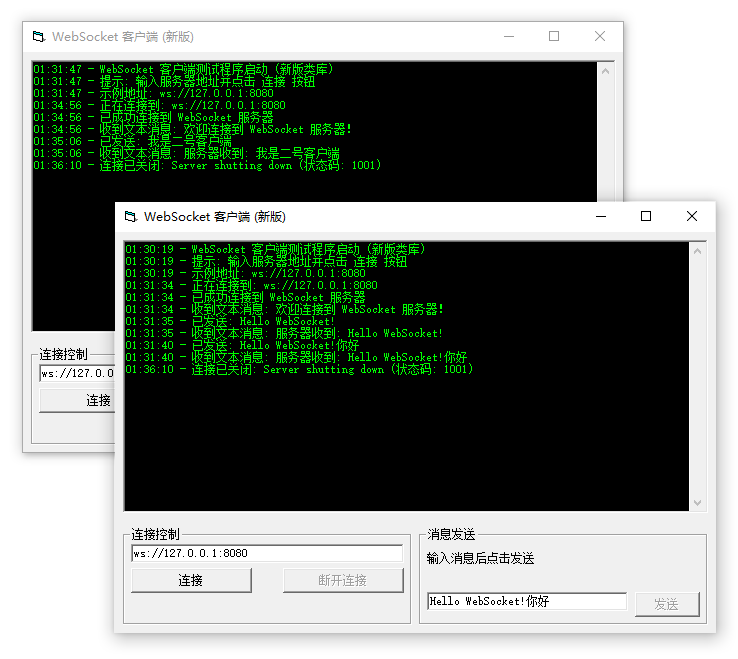
Creating a Client
Private WithEvents m_WsClient As cWebSocketClient

Private Sub InitializeClient()
    If m_WsClient Is Nothing Then
        Set m_WsClient = New cWebSocketClient
    End If
End Sub
Connecting to Server
Private Sub ConnectToServer(ByVal sURL As String)
    On Error GoTo EH

    InitializeClient()
    m_WsClient.Connect sURL

    LogMessage "Connecting to: " & sURL
    Exit Sub

EH:
    LogMessage "Connection failed: " & Err.Description
End Sub
Parameters:
sURL: WebSocket server URL- Format:
ws://host:portorwss://host:port(encrypted) - Example:
ws://127.0.0.1:8080
- Format:
Sending Text Message
Private Sub SendTextMessage(sMessage As String)
    On Error GoTo EH

    If Not m_WsClient Is Nothing And m_WsClient.State = WS_STATE_OPEN Then
        m_WsClient.SendText sMessage
        LogMessage "Sent: " & sMessage
    End If
    Exit Sub

EH:
    LogMessage "Send failed: " & Err.Description
End Sub
Sending Binary Message
Private Sub SendBinaryMessage(Data() As Byte)
    On Error GoTo EH

    If Not m_WsClient Is Nothing And m_WsClient.State = WS_STATE_OPEN Then
        m_WsClient.SendBinary Data
        LogMessage "Sent binary data: " & (UBound(Data) + 1) & " bytes"
    End If
    Exit Sub

EH:
    LogMessage "Send failed: " & Err.Description
End Sub
Sending Ping Frame
Private Sub SendPing(Optional Data() As Byte)
    On Error GoTo EH

    If Not m_WsClient Is Nothing And m_WsClient.State = WS_STATE_OPEN Then
        m_WsClient.Ping Data
        LogMessage "Ping sent"
    End If
    Exit Sub

EH:
    LogMessage "Ping send failed: " & Err.Description
End Sub
Disconnecting
Private Sub Disconnect(Optional ByVal Code As WsCloseCode = WS_CLOSE_NORMAL, Optional ByVal Reason As String = "")
    If Not m_WsClient Is Nothing Then
        m_WsClient.CloseConnection Code, Reason
        LogMessage "Disconnected"
    End If
End Sub
Close Code Description:
WS_CLOSE_NORMAL(1000): Normal closureWS_CLOSE_GOING_AWAY(1001): Endpoint going awayWS_CLOSE_PROTOCOL_ERROR(1002): Protocol errorWS_CLOSE_UNSUPPORTED(1003): Unsupported data typeWS_CLOSE_NO_STATUS(1005): No status codeWS_CLOSE_ABNORMAL(1006): Abnormal closureWS_CLOSE_INVALID_PAYLOAD(1007): Invalid dataWS_CLOSE_POLICY_VIOLATION(1008): Policy violationWS_CLOSE_MESSAGE_TOO_BIG(1009): Message too largeWS_CLOSE_MANDATORY_EXT(1010): Mandatory extension missingWS_CLOSE_INTERNAL_ERROR(1011): Internal errorWS_CLOSE_TLS_HANDSHAKE(1015): TLS handshake failed
Complete Example
Refer to Client/frmClient.frm file:
Private Sub cmdConnect_Click()
    On Error GoTo EH

    If m_WsClient Is Nothing Then
        Set m_WsClient = New cWebSocketClient
    End If

    m_WsClient.Connect txtURL.Text

    LogMessage "Connecting to: " & txtURL.Text
    cmdConnect.Enabled = False
    Exit Sub
EH:
    LogMessage "Connection failed: " & Err.Description
End Sub

Private Sub cmdSend_Click()
    On Error GoTo EH

    If Not m_WsClient Is Nothing And m_WsClient.State = WS_STATE_OPEN Then
        m_WsClient.SendText txtMessage.Text
        LogMessage "Sent: " & txtMessage.Text
    End If
    Exit Sub
EH:
    LogMessage "Send failed: " & Err.Description
End Sub

Private Sub UpdateUI(bConnected As Boolean)
    cmdConnect.Enabled = Not bConnected
    cmdDisconnect.Enabled = bConnected
    cmdSend.Enabled = bConnected
End Sub
WebSocket Server
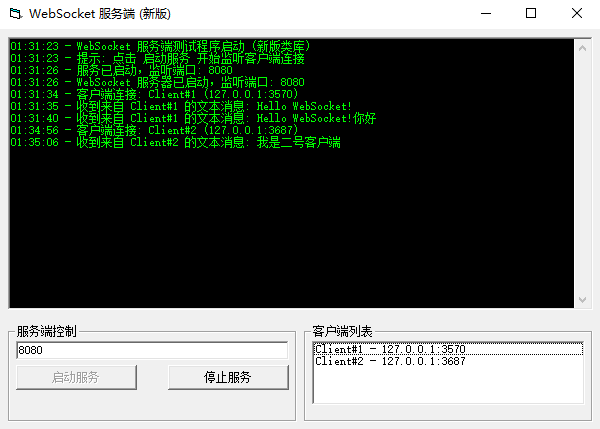
Creating a Server
Private WithEvents m_WsServer As cWebSocketServer

Private Sub InitializeServer()
    If m_WsServer Is Nothing Then
        Set m_WsServer = New cWebSocketServer
    End If
End Sub
Starting to Listen
Private Sub StartServer(ByVal lPort As Long)
    On Error GoTo EH

    InitializeServer()
    m_WsServer.Listen lPort

    LogMessage "WebSocket server started, listening on port: " & lPort
    Exit Sub

EH:
    LogMessage "Service start failed: " & Err.Description
End Sub
Stopping Service
Private Sub StopServer()
    If Not m_WsServer Is Nothing Then
        m_WsServer.StopServer
        LogMessage "WebSocket server stopped"
    End If
End Sub
Sending Message to Specific Client
Private Sub SendToClient(ByVal ClientID As String, sMessage As String)
    On Error GoTo EH

    m_WsServer.SendText ClientID, sMessage
    LogMessage "Sent message to client " & ClientID & ": " & sMessage
    Exit Sub

EH:
    LogMessage "Send failed: " & Err.Description
End Sub
Sending Binary Message to Specific Client
Private Sub SendBinaryToClient(ByVal ClientID As String, Data() As Byte)
    On Error GoTo EH

    m_WsServer.SendBinary ClientID, Data
    LogMessage "Sent binary data to client " & ClientID & ": " & (UBound(Data) + 1) & " bytes"
    Exit Sub

EH:
    LogMessage "Send failed: " & Err.Description
End Sub
Broadcasting Message
Private Sub BroadcastMessage(sMessage As String, Optional ByVal ExcludeClientID As String = "")
    On Error GoTo EH

    m_WsServer.BroadcastText sMessage, ExcludeClientID
    LogMessage "Broadcast message: " & sMessage
    Exit Sub

EH:
    LogMessage "Broadcast failed: " & Err.Description
End Sub
Parameters:
sMessage: Message to broadcastExcludeClientID: Optional, client ID to exclude from broadcast (won't receive broadcast)
Broadcasting Binary Message
Private Sub BroadcastBinaryMessage(Data() As Byte, Optional ByVal ExcludeClientID As String = "")
    On Error GoTo EH

    m_WsServer.BroadcastBinary Data, ExcludeClientID
    LogMessage "Broadcast binary data: " & (UBound(Data) + 1) & " bytes"
    Exit Sub

EH:
    LogMessage "Broadcast failed: " & Err.Description
End Sub
Disconnecting Specific Client
Private Sub DisconnectClient(ByVal ClientID As String, Optional ByVal Code As WsCloseCode = WS_CLOSE_NORMAL, Optional ByVal Reason As String = "")
    On Error GoTo EH

    m_WsServer.DisconnectClient ClientID, Code, Reason
    LogMessage "Disconnected client " & ClientID
    Exit Sub

EH:
    LogMessage "Disconnect client failed: " & Err.Description
End Sub
Getting Client Information
Private Sub GetClientInfo(ByVal ClientID As String)
    Dim oClient As cWebSocketServerClient

    Set oClient = m_WsServer.GetClient(ClientID)

    If Not oClient Is Nothing Then
        LogMessage "Client ID: " & oClient.ID
        LogMessage "Remote Address: " & oClient.RemoteAddress
        LogMessage "Remote Port: " & oClient.RemotePort
        LogMessage "Connection Time: " & oClient.ConnectedTime
    End If
End Sub
Complete Example
Refer to Server/frmServer.frm file:
Private Sub cmdStart_Click()
    On Error GoTo EH

    If m_WsServer Is Nothing Then
        Set m_WsServer = New cWebSocketServer
    End If

    m_WsServer.Listen CLng(txtPort.Text)

    LogMessage "WebSocket server started, listening on port: " & txtPort.Text
    cmdStart.Enabled = False
    cmdStop.Enabled = True
    Exit Sub
EH:
    LogMessage "Service start failed: " & Err.Description
End Sub

Private Sub m_WsServer_OnClientTextMessage(ByVal ClientID As String, ByVal Message As String)
    LogMessage "Received text message from " & ClientID & ": " & Message

    ' Echo message
    m_WsServer.SendText ClientID, "Server received: " & Message

    ' If message is "broadcast", broadcast to all clients
    If LCase$(Message) = "broadcast" Then
        m_WsServer.BroadcastText "This is a broadcast message from client " & ClientID, ClientID
        LogMessage "Broadcast message sent to all clients"
    End If
End Sub
API Reference
cWebSocketClient Properties
| Property | Type | Description |
|---|---|---|
State | WsState | Connection state (see state constants) |
URL | String | Connected WebSocket URL |
ReadyState | WsState | ReadyState property (same as State) |
cWebSocketClient Methods
Connect
m_WsClient.Connect URLConnects to WebSocket server.
Parameters:
URL: WebSocket server URL
SendText
m_WsClient.SendText MessageSends text message.
Parameters:
Message: Text message content
SendBinary
m_WsClient.SendBinary Data()Sends binary message.
Parameters:
Data: Byte array
Ping
m_WsClient.Ping [Data()]Sends Ping frame.
Parameters:
Data: Optional, additional data
CloseConnection
m_WsClient.CloseConnection [Code], [Reason]Closes connection.
Parameters:
Code: Optional, close code (default WS_CLOSE_NORMAL)Reason: Optional, close reason
cWebSocketServer Methods
Listen
m_WsServer.Listen PortStarts listening on specified port.
Parameters:
Port: Listening port number
StopServer
m_WsServer.StopServerStops service and disconnects all clients.
SendText
m_WsServer.SendText ClientID, MessageSends text message to specified client.
Parameters:
ClientID: Client IDMessage: Text message content
SendBinary
m_WsServer.SendBinary ClientID, Data()Sends binary message to specified client.
Parameters:
ClientID: Client IDData: Byte array
BroadcastText
m_WsServer.BroadcastText Message, [ExcludeClientID]Broadcasts text message to all clients.
Parameters:
Message: Text message contentExcludeClientID: Optional, client ID to exclude
BroadcastBinary
m_WsServer.BroadcastBinary Data(), [ExcludeClientID]Broadcasts binary message to all clients.
Parameters:
Data: Byte arrayExcludeClientID: Optional, client ID to exclude
DisconnectClient
m_WsServer.DisconnectClient ClientID, [Code], [Reason]Disconnects specified client.
Parameters:
ClientID: Client IDCode: Optional, close codeReason: Optional, close reason
GetClient
Set oClient = m_WsServer.GetClient(ClientID)Gets client object.
Parameters:
ClientID: Client ID
Returns: cWebSocketServerClient object
State Constants
| Constant | Value | Description |
|---|---|---|
WS_STATE_CONNECTING | 0 | Connecting |
WS_STATE_OPEN | 1 | Connected |
WS_STATE_CLOSING | 2 | Closing |
WS_STATE_CLOSED | 3 | Closed |
Event Reference
Client Events
OnOpen
Private Sub m_WsClient_OnOpen()Triggered when connection is successfully established.
OnClose
Private Sub m_WsClient_OnClose(ByVal Code As WsCloseCode, ByVal Reason As String)Triggered when connection is closed.
Parameters:
Code: Close codeReason: Close reason
OnTextMessage
Private Sub m_WsClient_OnTextMessage(ByVal Message As String)Triggered when text message is received.
Parameters:
Message: Text message content
OnBinaryMessage
Private Sub m_WsClient_OnBinaryMessage(Data() As Byte)Triggered when binary message is received.
Parameters:
Data: Binary data array
OnError
Private Sub m_WsClient_OnError(ByVal Description As String)Triggered when an error occurs.
Parameters:
Description: Error description
OnPong
Private Sub m_WsClient_OnPong(Data() As Byte)Triggered when Pong response is received.
Parameters:
Data: Pong data
Server Events
OnStart
Private Sub m_WsServer_OnStart(ByVal Port As Long)Triggered when service starts.
Parameters:
Port: Listening port number
OnStop
Private Sub m_WsServer_OnStop()Triggered when service stops.
OnClientConnect
Private Sub m_WsServer_OnClientConnect(ByVal ClientID As String, ByVal RemoteAddress As String, ByVal RemotePort As Long)Triggered when new client connects.
Parameters:
ClientID: Client IDRemoteAddress: Client IP addressRemotePort: Client port
OnClientDisconnect
Private Sub m_WsServer_OnClientDisconnect(ByVal ClientID As String, ByVal Reason As String)Triggered when client disconnects.
Parameters:
ClientID: Client IDReason: Disconnect reason
OnClientTextMessage
Private Sub m_WsServer_OnClientTextMessage(ByVal ClientID As String, ByVal Message As String)Triggered when text message is received from client.
Parameters:
ClientID: Client IDMessage: Text message content
OnClientBinaryMessage
Private Sub m_WsServer_OnClientBinaryMessage(ByVal ClientID As String, Data() As Byte)Triggered when binary message is received from client.
Parameters:
ClientID: Client IDData: Binary data array
OnError
Private Sub m_WsServer_OnError(ByVal Description As String)Triggered when an error occurs.
Parameters:
Description: Error description
Advanced Features
Client Auto-reconnect
Implement client auto-reconnection mechanism:
Private WithEvents tmrReconnect As Timer
Private lReconnectAttempts As Long

Private Sub m_WsClient_OnClose(ByVal Code As WsCloseCode, ByVal Reason As String)
    LogMessage "Connection closed: " & Reason

    ' Attempt reconnection on abnormal close
    If Code <> WS_CLOSE_NORMAL Then
        StartReconnectTimer
    End If
End Sub

Private Sub StartReconnectTimer()
    lReconnectAttempts = 0
    Set tmrReconnect = New Timer
    tmrReconnect.Interval = 3000  ' Reconnect after 3 seconds
    tmrReconnect.Enabled = True
End Sub

Private Sub tmrReconnect_Timer()
    tmrReconnect.Enabled = False

    If lReconnectAttempts < 5 Then
        lReconnectAttempts = lReconnectAttempts + 1
        LogMessage "Attempting to reconnect (" & lReconnectAttempts & "/5)..."
        m_WsClient.Connect txtURL.Text
    Else
        LogMessage "Reconnection failed, maximum attempts reached"
    End If
End Sub
Heartbeat Keep-alive
Implement heartbeat keep-alive for both client and server:
' Client side
Private WithEvents tmrHeartbeat As Timer

Private Sub m_WsClient_OnOpen()
    LogMessage "Connected, starting heartbeat"

    Set tmrHeartbeat = New Timer
    tmrHeartbeat.Interval = 30000  ' 30 seconds
    tmrHeartbeat.Enabled = True
End Sub

Private Sub tmrHeartbeat_Timer()
    If m_WsClient.State = WS_STATE_OPEN Then
        m_WsClient.Ping
        LogMessage "Heartbeat Ping sent"
    End If
End Sub

' Server side - record last activity time
Private Sub m_WsServer_OnClientTextMessage(ByVal ClientID As String, ByVal Message As String)
    ' Record client activity time
    Dim oClient As cWebSocketServerClient
    Set oClient = m_WsServer.GetClient(ClientID)
    If Not oClient Is Nothing Then
        oClient.LastActivity = Now
    End If
End Sub
Message Queue
Implement message queue to ensure message order:
Private colMessageQueue As Collection
Private bSending As Boolean

Private Sub InitializeQueue()
    Set colMessageQueue = New Collection
    bSending = False
End Sub

Private Sub EnqueueMessage(sMessage As String)
    colMessageQueue.Add sMessage

    If Not bSending Then
        ProcessQueue
    End If
End Sub

Private Sub ProcessQueue()
    If colMessageQueue.Count > 0 And m_WsClient.State = WS_STATE_OPEN Then
        bSending = True

        ' Get first message from queue
        Dim sMessage As String
        sMessage = colMessageQueue(1)
        colMessageQueue.Remove 1

        ' Send message
        m_WsClient.SendText sMessage
    Else
        bSending = False
    End If
End Sub

Private Sub m_WsClient_OnTextMessage(ByVal Message As String)
    LogMessage "Received response: " & Message

    ' Process next message
    If colMessageQueue.Count > 0 Then
        ProcessQueue
    Else
        bSending = False
    End If
End Sub
Authentication Mechanism
Implement simple token authentication:
' Server - validate on connection
Private Sub m_WsServer_OnClientConnect(ByVal ClientID As String, ByVal RemoteAddress As String, ByVal RemotePort As Long)
    Dim oClient As cWebSocketServerClient
    Set oClient = m_WsServer.GetClient(ClientID)

    ' Check token in query parameters
    Dim sToken As String
    sToken = ExtractTokenFromClient(oClient)

    If Not IsValidToken(sToken) Then
        LogMessage "Authentication failed, disconnecting client: " & ClientID
        m_WsServer.DisconnectClient ClientID, WS_CLOSE_POLICY_VIOLATION, "Invalid token"
        Exit Sub
    End If

    LogMessage "Client authenticated successfully: " & ClientID
End Sub

' Client - attach token in URL
Private Sub ConnectWithToken(ByVal sURL As String, ByVal sToken As String)
    Dim sURLWithToken As String
    sURLWithToken = sURL & "?token=" & sToken

    m_WsClient.Connect sURLWithToken
End Sub
Message Compression
Use Deflate algorithm to compress messages:
Private Sub SendCompressedMessage(sMessage As String)
    Dim byOriginal() As Byte
    Dim byCompressed() As Byte

    ' Convert to UTF-8 byte array
    byOriginal = UTF8.GetBytes(sMessage)

    ' Compress data (need to implement Deflate compression function)
    byCompressed = CompressData(byOriginal)

    ' Send compressed data
    m_WsClient.SendBinary byCompressed
    LogMessage "Sent compressed message: " & (UBound(byOriginal) + 1) & " -> " & (UBound(byCompressed) + 1) & " bytes"
End Sub
FAQ
Q1: How to handle connection timeout?
A: Use a timer to monitor connection state:
Private WithEvents tmrConnect As Timer

Private Sub StartConnectTimer()
    Set tmrConnect = New Timer
    tmrConnect.Interval = 10000  ' 10 second timeout
    tmrConnect.Enabled = True
End Sub

Private Sub tmrConnect_Timer()
    tmrConnect.Enabled = False

    If m_WsClient.State = WS_STATE_CONNECTING Then
        LogMessage "Connection timeout"
        m_WsClient.CloseConnection WS_CLOSE_ABNORMAL, "Connection timeout"
        UpdateUI False
    End If
End Sub

Private Sub m_WsClient_OnOpen()
    tmrConnect.Enabled = False
    LogMessage "Connection successful"
End Sub
Q2: How to handle large messages?
A: Use message chunking:
Private Sub SendLargeMessage(sMessage As String)
    Const MAX_CHUNK_SIZE As Long = 1024  ' 1KB chunk
    Dim lLength As Long
    Dim lOffset As Long
    Dim sChunk As String

    lLength = Len(sMessage)
    lOffset = 1

    Do While lOffset <= lLength
        sChunk = Mid(sMessage, lOffset, MAX_CHUNK_SIZE)
        m_WsClient.SendText sChunk

        LogMessage "Sent chunk " & (lOffset \ MAX_CHUNK_SIZE + 1) & ": " & Len(sChunk) & " bytes"
        lOffset = lOffset + MAX_CHUNK_SIZE

        ' Short delay
        DoEvents
        Sleep 50
    Loop
End Sub
Q3: How to limit client connections?
A: Maintain client count on server:
Private lMaxClients As Long
Private lCurrentClients As Long

Private Sub InitializeServer()
    lMaxClients = 100  ' Maximum client count
    lCurrentClients = 0
End Sub

Private Sub m_WsServer_OnClientConnect(ByVal ClientID As String, ByVal RemoteAddress As String, ByVal RemotePort As Long)
    If lCurrentClients >= lMaxClients Then
        LogMessage "Connection rejected: maximum client count reached"
        m_WsServer.DisconnectClient ClientID, WS_CLOSE_TRY_AGAIN_LATER, "Server full"
        Exit Sub
    End If

    lCurrentClients = lCurrentClients + 1
    LogMessage "Client connection: " & ClientID & " (current: " & lCurrentClients & "/" & lMaxClients & ")"
End Sub

Private Sub m_WsServer_OnClientDisconnect(ByVal ClientID As String, ByVal Reason As String)
    lCurrentClients = lCurrentClients - 1
    LogMessage "Client disconnect: " & ClientID & " (current: " & lCurrentClients & ")"
End Sub
Q4: How to implement room functionality?
A: Use client grouping:
Private colRooms As Collection

Private Sub InitializeRooms()
    Set colRooms = New Collection
End Sub

' Join room
Private Sub JoinRoom(ByVal ClientID As String, ByVal sRoom As String)
    Dim colClients As Collection

    On Error Resume Next
    Set colClients = colRooms(sRoom)

    If colClients Is Nothing Then
        Set colClients = New Collection
        colRooms.Add colClients, sRoom
    End If

    On Error GoTo 0
    colClients.Add ClientID, ClientID
    LogMessage "Client " & ClientID & " joined room: " & sRoom
End Sub

' Send to room
Private Sub SendToRoom(ByVal sRoom As String, ByVal sMessage As String)
    Dim colClients As Collection
    Dim i As Long

    On Error Resume Next
    Set colClients = colRooms(sRoom)
    On Error GoTo 0

    If Not colClients Is Nothing Then
        For i = 1 To colClients.Count
            m_WsServer.SendText colClients(i), sMessage
        Next i
    End If
End Sub
Q5: How to debug WebSocket communication?
A: Record all events and detailed logs:
Private Sub LogWebSocketEvent(ByVal sEventType As String, ByVal sDetails As String)
    Dim sLog As String
    sLog = Format$(Now, "yyyy-mm-dd hh:mm:ss") & " [" & sEventType & "] " & sDetails

    ' Output to log window
    txtLog.Text = txtLog.Text & sLog & vbCrLf
    txtLog.SelStart = Len(txtLog.Text)

    ' Output to debug window
    Debug.Print sLog

    ' Optional: write to file
    LogToFile sLog
End Sub

Private Sub LogToFile(sLog As String)
    Dim nFile As Integer
    nFile = FreeFile

    Open App.Path & "\websocket.log" For Append As #nFile
    Print #nFile, sLog
    Close #nFile
End Sub
Best Practices
- Resource cleanup: Call
CloseConnectionorStopServerwhen form unloads to release resources - Error handling: Include error handling for all network operations
- State checking: Check
State = WS_STATE_OPENbefore sending messages - Logging: Record key events for easier debugging and troubleshooting
- Timeout handling: Implement reasonable connection and operation timeouts
- Heartbeat keep-alive: Periodically send Ping frames to keep connection active
- Message validation: Validate format and length when receiving messages
- Graceful shutdown: Use correct close codes and reason information
- Client limiting: Implement reasonable client connection limits
- Security authentication: Implement authentication mechanisms in production environments
Protocol Specification
WebSocket Handshake Process
- Client Request
GET /chat HTTP/1.1
Host: server.example.com
Upgrade: websocket
Connection: Upgrade
Sec-WebSocket-Key: dGhlIHNhbXBsZSBub25jZQ==
Sec-WebSocket-Version: 13- Server Response
HTTP/1.1 101 Switching Protocols
Upgrade: websocket
Connection: Upgrade
Sec-WebSocket-Accept: s3pPLMBiTxaQ9kYGzzhZRbK+xOo=
Frame Structure
 0                   1                   2                   3
 0 1 2 3 4 5 6 7 8 9 0 1 2 3 4 5 6 7 8 9 0 1 2 3 4 5 6 7 8 9 0 1
+-+-+-+-+-------+-+-------------+-------------------------------+
|F|R|R|R| opcode|M| Payload len |    Extended payload length    |
|I|S|S|S|  (4)  |A|     (7)     |             (16/64)           |
|N|V|V|V|       |S|             |   (if payload len==126/127)   |
| |1|2|3|       |K|             |                               |
+-+-+-+-+-------+-+-------------+ - - - - - - - - - - - - - - - +
|     Extended payload length continued, if payload len == 127  |
+ - - - - - - - - - - - - - - - +-------------------------------+
|                               |Masking-key, if MASK set to 1  |
+-------------------------------+-------------------------------+
| Masking-key (continued)       |           Payload Data         |
+-------------------------------- - - - - - - - - - - - - - - - +
:                     Payload Data continued ...                :
+ - - - - - - - - - - - - - - - - - - - - - - - - - - - - - - - +
|                     Payload Data continued ...                |
+---------------------------------------------------------------+
Opcodes
| Value | Description |
|---|---|
| 0x0 | Continuation frame |
| 0x1 | Text frame |
| 0x2 | Binary frame |
| 0x8 | Close frame |
| 0x9 | Ping frame |
| 0xA | Pong frame |
Related Resources
- Project directory:
Websocket/ - Client example:
Client/frmClient.frm - Server example:
Server/frmServer.frm - Dependency library:
VBMAN.dll - WebSocket Protocol: RFC 6455
Changelog
- v2.0 - New library version, separated client/server, optimized architecture
- Separated client (
cWebSocketClient) and server (cWebSocketServer) classes - Independent frame parser (
cWebSocketFrame) - Efficient buffer management (
cByteBuffer) - Clear separation of concerns and error handling
- Separated client (
- v1.0 - Initial version