
cWinsock Development Guide
Table of Contents
- Overview
- Quick Start
- TCP Client
- TCP Server
- UDP Communication
- API Reference
- Event Reference
- Advanced Features
- FAQ
Overview
cWinsock is a high-level wrapper class based on Windows Socket API, providing an easy-to-use VB6 network programming interface. It supports both TCP and UDP protocols, allowing you to easily create client and server applications.
Key Features
- Multi-protocol Support: Supports TCP and UDP protocols
- Asynchronous Non-blocking: Uses asynchronous I/O model without blocking UI thread
- Multi-client Management: Server automatically manages multiple client connections
- Event-driven: Handles network events through event mechanism
- Error Handling: Comprehensive error handling mechanism
Project Structure
Winsock/
念岸岸 Form1.frm          # Main form (Server + UDP example)
念岸岸 Client.frm         # Client form
念岸岸 Module1.bas        # Module file
念岸岸 Project1.vbp       # Project file
弩岸岸 README.md          # Example description
Quick Start
Requirements
- Visual Basic 6.0 or higher
- VBMAN.dll library (located in
..\..\vbman\dist\DLL\)
Reference Library
- Open project
Project1.vbp - Ensure
VBMANLIBlibrary is referenced - Check reference path:
..\..\vbman\dist\DLL\VBMAN.dll
Basic Code Structure
' Declare cWinsock object (with events)
Private WithEvents m_oSocket As cWinsock

' Initialize object
Set m_oSocket = New cWinsock

' Set protocol type
m_oSocket.Protocol = sckTCPProtocol  ' or sckUDPProtocol
TCP Client
A TCP client is used to connect to a remote server and establish a reliable connection for bidirectional communication.
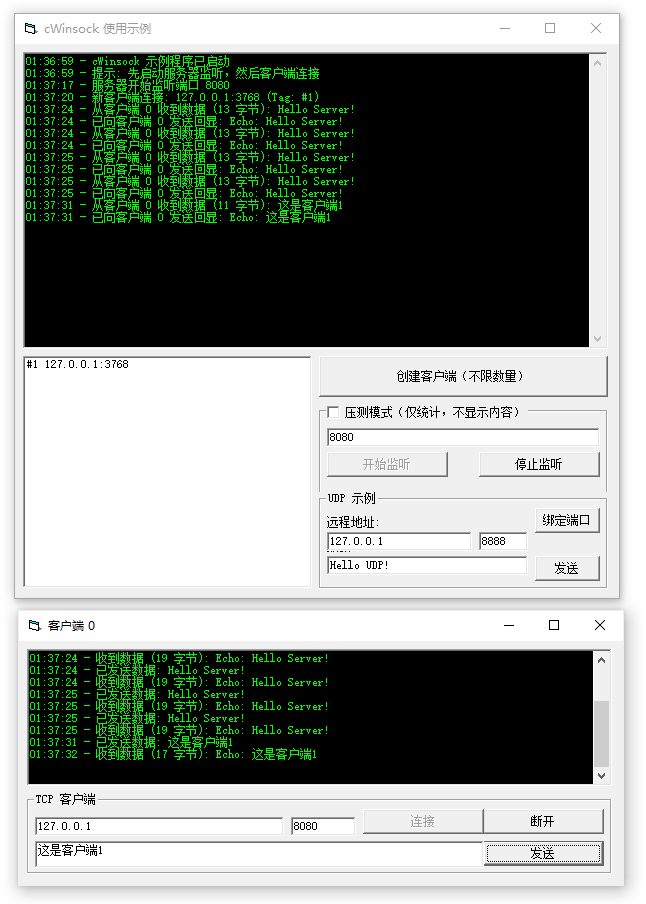
Creating a TCP Client
Private WithEvents m_oClient As cWinsock

Private Sub InitializeClient()
    If m_oClient Is Nothing Then
        Set m_oClient = New cWinsock
        m_oClient.Protocol = sckTCPProtocol
    End If
End Sub
Connecting to Server
Private Sub ConnectToServer(ByVal sHost As String, ByVal lPort As Long)
    On Error GoTo EH

    InitializeClient()
    m_oClient.Connect sHost, lPort

    LogMessage "Connecting to " & sHost & ":" & lPort & "..."
    Exit Sub

EH:
    LogMessage "Connection error: " & Err.Description
End Sub
Parameters:
sHost: Server IP address or hostname (e.g., "127.0.0.1" or "example.com")lPort: Server port number (e.g., 8080)
Sending Data
Private Sub SendData(sData As String)
    On Error GoTo EH

    If Not m_oClient Is Nothing And m_oClient.State = sckConnected Then
        m_oClient.SendData sData
        LogMessage "Data sent: " & sData
    Else
        LogMessage "Not connected to server"
    End If
    Exit Sub

EH:
    LogMessage "Send error: " & Err.Description
End Sub
Disconnecting
Private Sub Disconnect()
    If Not m_oClient Is Nothing Then
        m_oClient.Close_
        LogMessage "Client disconnected"
    End If
End Sub
Complete Example
Refer to Client.frm file for a complete TCP client implementation:
Private Sub cmdClientConnect_Click()
    On Error GoTo EH

    If m_oClient Is Nothing Then
        Set m_oClient = New cWinsock
        m_oClient.Protocol = sckTCPProtocol
    End If

    m_oClient.Connect txtClientHost.Text, CLng(txtClientPort.Text)

    LogMessage "Connecting to " & txtClientHost.Text & ":" & txtClientPort.Text & "..."
    Exit Sub
EH:
    LogMessage "Connection error: " & Err.Description
End Sub

Private Sub cmdClientDisconnect_Click()
    If Not m_oClient Is Nothing Then
        m_oClient.Close_
        LogMessage "Client disconnected"
    End If
    cmdClientConnect.Enabled = True
    cmdClientDisconnect.Enabled = False
    cmdClientSend.Enabled = False
End Sub

Private Sub cmdClientSend_Click()
    On Error GoTo EH

    If Not m_oClient Is Nothing And m_oClient.State = sckConnected Then
        m_oClient.SendData txtClientData.Text
        LogMessage "Data sent: " & txtClientData.Text
    End If
    Exit Sub
EH:
    LogMessage "Send error: " & Err.Description
End Sub
TCP Server
A TCP server listens on a specified port, accepts multiple client connections, and can communicate independently with each client.
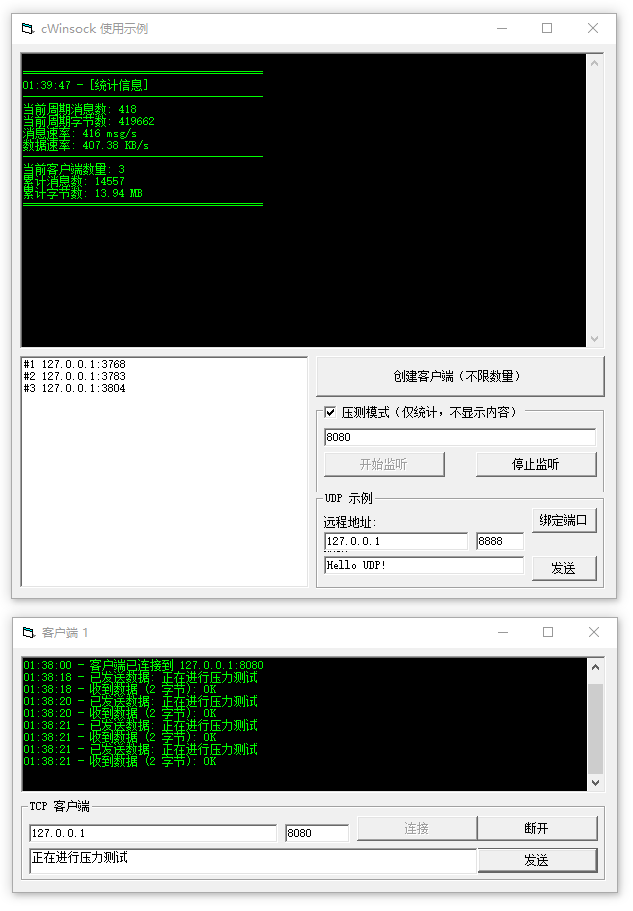
Creating a TCP Server
Private WithEvents m_oServer As cWinsock

Private Sub InitializeServer()
    If m_oServer Is Nothing Then
        Set m_oServer = New cWinsock
    End If

    m_oServer.Protocol = sckTCPProtocol
End Sub
Starting to Listen
Private Sub StartListening(ByVal lPort As Long)
    On Error GoTo EH

    InitializeServer()
    m_oServer.Listen lPort

    LogMessage "Server listening on port " & lPort
    Exit Sub

EH:
    LogMessage "Listen error: " & Err.Description
End Sub
Stopping Listening
Private Sub StopListening()
    If Not m_oServer Is Nothing Then
        m_oServer.Close_
        LogMessage "Server stopped listening"
    End If
End Sub
Handling Client Connection
Private Sub m_oServer_ConnectionRequest(Client As VBMANLIB.cWinsock, DisConnect As Boolean)
    ' In stress test mode, don't log connection
    If Not m_bStressTestMode Then
        LogMessage "New client connection: " & Client.RemoteHostIP & ":" & Client.RemotePort & " (Tag: " & Client.Tag & ")"
    End If

    ' Write Tag content to listbox
    lstClients.AddItem Client.Tag & " " & Client.RemoteHostIP & ":" & Client.RemotePort
End Sub
Stress Test Mode
Stress test mode is used for performance testing. In high concurrency scenarios, it only collects statistics without displaying detailed logs:
' Stress test mode variables
Private m_bStressTestMode As Boolean
Private m_lMsgCount As Long          ' Current period message count
Private m_lBytesCount As Long         ' Current period byte count
Private m_lTotalMsgCount As Long      ' Total message count
Private m_lTotalBytesCount As Long     ' Total byte count
Private m_lCurrentClientCount As Long  ' Current client count
Private m_dLastStatsTime As Double    ' Last statistics time
Private WithEvents tmrStats As VB.Timer

' Toggle stress test mode
Private Sub chkStressTest_Click()
    m_bStressTestMode = (chkStressTest.Value = vbChecked)

    If m_bStressTestMode Then
        LogMessage "Stress test mode enabled - Statistics only, no message content displayed"
        ResetStats
    Else
        LogMessage "Stress test mode disabled - Display all message content"
    End If
End Sub

' Receive data (stress test mode)
Private Sub m_oServer_DataArrival(Client As cWinsock, ByVal bytesTotal As Long)
    Dim sData As String
    Dim sResponse As String

    On Error GoTo EH

    If m_bStressTestMode Then
        ' Stress test mode: only statistics, no content display
        Client.GetData sData, vbString, bytesTotal

        ' Accumulate statistics
        m_lMsgCount = m_lMsgCount + 1
        m_lBytesCount = m_lBytesCount + bytesTotal
        m_lTotalMsgCount = m_lTotalMsgCount + 1
        m_lTotalBytesCount = m_lTotalBytesCount + bytesTotal

        ' Echo data
        sResponse = "OK"
        Client.SendData sResponse
    Else
        ' Normal mode: display content
        Client.GetData sData
        LogMessage "Received data from client " & Client.Tag & " (" & bytesTotal & " bytes): " & sData
        sResponse = "Echo: " & sData
        Client.SendData sResponse
        LogMessage "Sent echo to client " & Client.Tag & ": " & sResponse
    End If
    Exit Sub
EH:
    LogMessage "Server receive data error: " & Err.Description
End Sub

' Statistics timer (update every second)
Private Sub tmrStats_Timer()
    Dim dCurrentTime As Double
    Dim dElapsedTime As Double
    Dim lMsgPerSec As Long
    Dim lBytesPerSec As Long
    Dim sStats As String

    If m_bStressTestMode Then
        dCurrentTime = Timer
        dElapsedTime = dCurrentTime - m_dLastStatsTime

        If dElapsedTime > 0 Then
            lMsgPerSec = CLng(m_lMsgCount / dElapsedTime)
            lBytesPerSec = CLng(m_lBytesCount / dElapsedTime)

            ' Build statistics info (one item per line)
            sStats = vbCrLf & _
                     "========================================" & vbCrLf & _
                     Format$(Now, "hh:mm:ss") & " - [Statistics]" & vbCrLf & _
                     "----------------------------------------" & vbCrLf & _
                     "Current period messages: " & m_lMsgCount & vbCrLf & _
                     "Current period bytes: " & m_lBytesCount & vbCrLf & _
                     "Message rate: " & lMsgPerSec & " msg/s" & vbCrLf & _
                     "Data rate: " & Format$(lBytesPerSec / 1024, "0.00") & " KB/s" & vbCrLf & _
                     "----------------------------------------" & vbCrLf & _
                     "Current client count: " & m_lCurrentClientCount & vbCrLf & _
                     "Total messages: " & m_lTotalMsgCount & vbCrLf & _
                     "Total bytes: " & Format$(m_lTotalBytesCount / 1024 / 1024, "0.00") & " MB" & vbCrLf & _
                     "========================================" & vbCrLf

            ' Replace textbox content directly
            txtLog.Text = sStats
            txtLog.SelStart = Len(txtLog.Text)

            ' Reset current period statistics
            m_lMsgCount = 0
            m_lBytesCount = 0
            m_dLastStatsTime = dCurrentTime
        End If
    End If
End Sub
Receiving and Sending Data
Private Sub m_oServer_DataArrival(Client As cWinsock, ByVal bytesTotal As Long)
    Dim sData As String
    Dim sResponse As String

    On Error GoTo EH

    ' Get data
    Client.GetData sData
    LogMessage "Received data from client " & Client.Tag & " (" & bytesTotal & " bytes): " & sData

    ' Process data and send back
    sResponse = "Echo: " & sData
    Client.SendData sResponse
    LogMessage "Sent echo to client " & Client.Tag & ": " & sResponse
    Exit Sub

EH:
    LogMessage "Server receive data error: " & Err.Description
End Sub
Handling Client Disconnect
Private Sub m_oServer_CloseEvent(Client As cWinsock)
    Dim i As Long

    ' In stress test mode, don't log disconnection
    If Not m_bStressTestMode Then
        LogMessage "Client " & Client.RemoteHostIP & ":" & Client.RemotePort & " disconnected"
    End If

    ' Use Tag to traverse listbox and remove matching item
    For i = 0 To lstClients.ListCount - 1
        If InStr(lstClients.List(i), Client.Tag) > 0 Then
            lstClients.RemoveItem i
            Exit For
        End If
    Next
End Sub
Complete Example
Refer to the server implementation in Form1.frm:
Private Sub cmdServerListen_Click()
    On Error GoTo EH

    If m_oServer Is Nothing Then
        Set m_oServer = New cWinsock
    End If

    m_oServer.Protocol = sckTCPProtocol
    m_oServer.Listen CLng(txtServerPort.Text)

    LogMessage "Server listening on port " & txtServerPort.Text
    cmdServerListen.Enabled = False
    cmdServerStop.Enabled = True
    Exit Sub
EH:
    LogMessage "Listen error: " & Err.Description
End Sub

Private Sub m_oServer_ConnectionRequest(Client As VBMANLIB.cWinsock, DisConnect As Boolean)
    LogMessage "New client connection: " & Client.RemoteHostIP & ":" & Client.RemotePort & " (Tag: " & Client.Tag & ")"
    lstClients.AddItem Client.Tag & " - " & Client.RemoteHostIP & ":" & Client.RemotePort
End Sub
UDP Communication
UDP (User Datagram Protocol) is a connectionless protocol, suitable for sending small amounts of data or scenarios where reliability is not critical.
Creating a UDP Socket
Private WithEvents m_oUdp As cWinsock

Private Sub InitializeUdp()
    If m_oUdp Is Nothing Then
        Set m_oUdp = New cWinsock
        m_oUdp.Protocol = sckUDPProtocol
    End If
End Sub
Binding Local Port
Private Sub BindUdpPort(ByVal lPort As Long)
    On Error GoTo EH

    InitializeUdp()
    m_oUdp.Bind lPort

    LogMessage "UDP Socket bound to port " & lPort
    Exit Sub

EH:
    LogMessage "UDP bind error: " & Err.Description
End Sub
Sending UDP Data
Private Sub SendUdpData(sHost As String, lPort As Long, sData As String)
    On Error GoTo EH

    With m_oUdp
        .RemoteHost = sHost
        .RemotePort = lPort
        .SendData sData
        LogMessage "UDP sent data to " & sHost & ":" & lPort & ": " & sData
    End With
    Exit Sub

EH:
    LogMessage "UDP send error: " & Err.Description
End Sub
Receiving UDP Data
Private Sub m_oUdp_DataArrival(Client As cWinsock, ByVal bytesTotal As Long)
    Dim sData As String

    On Error GoTo EH

    Client.GetData sData
    LogMessage "UDP received data (" & bytesTotal & " bytes) from " & Client.RemoteHostIP & ":" & Client.RemotePort & ": " & sData
    Exit Sub

EH:
    LogMessage "UDP receive data error: " & Err.Description
End Sub
Complete Example
Refer to the UDP implementation in Form1.frm:
Private Sub cmdUdpBind_Click()
    If m_oUdp Is Nothing Then
        Set m_oUdp = New cWinsock
        m_oUdp.Protocol = sckUDPProtocol
    End If

    m_oUdp.Bind CLng(txtUdpPort.Text)

    LogMessage "UDP Socket bound to port " & txtUdpPort.Text
End Sub

Private Sub cmdUdpSend_Click()
    On Error GoTo EH

    With m_oUdp
        .RemoteHost = txtUdpHost.Text
        .RemotePort = CLng(txtUdpPort.Text)
        .SendData txtUdpData.Text
        LogMessage "UDP sent data to " & txtUdpHost.Text & ":" & txtUdpPort.Text & ": " & txtUdpData.Text
    End With
    Exit Sub
EH:
    LogMessage "UDP send error: " & Err.Description
End Sub
API Reference
Properties
| Property | Type | Description |
|---|---|---|
Protocol | Integer | Protocol type: sckTCPProtocol (0) or sckUDPProtocol (1) |
State | Integer | Connection state, see state constants below |
RemoteHost | String | Remote host address |
RemoteHostIP | String | Remote host IP address (read-only) |
RemotePort | Long | Remote port number |
LocalPort | Long | Local port number (read-only) |
Tag | Variant | Tag for storing custom data |
Methods
Connect
oSocket.Connect RemoteHost, RemotePortConnects to the specified server.
Parameters:
RemoteHost: Server address (IP or hostname)RemotePort: Server port
Listen
oSocket.Listen PortStarts listening on the specified port (TCP server mode only).
Parameters:
Port: Listening port number
Bind
oSocket.Bind PortBinds to a local port (UDP mode only).
Parameters:
Port: Port number to bind
SendData
oSocket.SendData DataSends data to the remote endpoint.
Parameters:
Data: Data to send (string or byte array)
GetData
oSocket.GetData Data, [Type], [MaxLen]Retrieves received data from buffer.
Parameters:
Data: Variable to store received dataType: Optional, data type (default is string)MaxLen: Optional, maximum read length
Close_
oSocket.Close_Closes connection or stops listening.
State Constants
| Constant | Value | Description |
|---|---|---|
sckClosed | 0 | Connection closed |
sckOpen | 1 | Socket opened |
sckListening | 2 | Listening |
sckConnectionPending | 3 | Connection pending |
sckResolvingHost | 4 | Resolving host |
sckHostResolved | 5 | Host resolved |
sckConnecting | 6 | Connecting |
sckConnected | 7 | Connected |
sckClosing | 8 | Closing |
sckError | 9 | Error occurred |
Event Reference
Connect
Private Sub oSocket_Connect(Client As cWinsock)Triggered when client successfully connects to server.
Parameters:
Client: The cWinsock object that triggered the event
CloseEvent
Private Sub oSocket_CloseEvent(Client As cWinsock)Triggered when connection is closed.
Parameters:
Client: The cWinsock object that triggered the event
ConnectionRequest
Private Sub oSocket_ConnectionRequest(Client As cWinsock, DisConnect As Boolean)Triggered when server receives a new client connection request (TCP server only).
Parameters:
Client: The new client connection objectDisConnect: Set to True to reject connection, False to accept connection
DataArrival
Private Sub oSocket_DataArrival(Client As cWinsock, ByVal bytesTotal As Long)Triggered when data is received.
Parameters:
Client: The client object receiving databytesTotal: Number of bytes received
Error
Private Sub oSocket_Error(Client As cWinsock, ByVal Number As Long, Description As String, ByVal Scode As Long)Triggered when an error occurs.
Parameters:
Client: The client object where error occurredNumber: Error codeDescription: Error descriptionScode: System Scode error code
Advanced Features
Multi-client Management
The server automatically creates independent client objects for each connection. You can identify different clients using the Tag property:
Private Sub m_oServer_ConnectionRequest(Client As cWinsock, DisConnect As Boolean)
    ' Assign unique identifier
    Client.Tag = "Client_" & GetNextId()

    ' Store in collection for management
    colClients.Add Client, Client.Tag

    LogMessage "New client: " & Client.Tag
End Sub
Client Authentication
Implement simple authentication in the ConnectionRequest event:
Private Sub m_oServer_ConnectionRequest(Client As cWinsock, DisConnect As Boolean)
    ' Check IP whitelist
    If Not IsAllowedIP(Client.RemoteHostIP) Then
        DisConnect = True
        LogMessage "Connection rejected: " & Client.RemoteHostIP
        Exit Sub
    End If

    LogMessage "Connection accepted: " & Client.RemoteHostIP
End Sub
Data Fragmentation
Handle packet transmission for large amounts of data:
Private Sub m_oServer_DataArrival(Client As cWinsock, ByVal bytesTotal As Long)
    Static sBuffer As String
    Dim sData As String
    Dim lPos As Long

    Client.GetData sData
    sBuffer = sBuffer & sData

    ' Look for message end marker (e.g., newline)
    Do
        lPos = InStr(sBuffer, vbCrLf)
        If lPos > 0 Then
            ProcessMessage Client, Left(sBuffer, lPos - 1)
            sBuffer = Mid(sBuffer, lPos + 2)
        Else
            Exit Do
        End If
    Loop
End Sub
Auto-reconnect on Error
Implement automatic reconnection:
Private Sub m_oClient_CloseEvent(Client As cWinsock)
    LogMessage "Connection closed, attempting to reconnect..."

    ' Delayed reconnection
    Dim i As Integer
    For i = 1 To 3
        If TryReconnect() Then
            Exit Sub
        End If
        Sleep 2000
    Next i

    LogMessage "Reconnection failed"
End Sub
FAQ
Q1: How to handle connection timeout?
A: Use a timer to monitor connection state:
Private WithEvents tmrConnect As Timer

Private Sub StartConnectTimer()
    Set tmrConnect = New Timer
    tmrConnect.Interval = 10000  ' 10 second timeout
    tmrConnect.Enabled = True
End Sub

Private Sub tmrConnect_Timer()
    If m_oClient.State <> sckConnected Then
        m_oClient.Close_
        LogMessage "Connection timeout"
        tmrConnect.Enabled = False
    End If
End Sub
Q2: How to send binary data?
A: Use byte array:
Dim byData() As Byte
byData = StrConv("Hello", vbFromUnicode)
m_oClient.SendData byData
Q3: How to distinguish different senders in UDP mode?
A: Use RemoteHostIP and RemotePort properties:
Private Sub m_oUdp_DataArrival(Client As cWinsock, ByVal bytesTotal As Long)
    Dim sSender As String
    sSender = Client.RemoteHostIP & ":" & Client.RemotePort

    LogMessage "Received data from " & sSender
End Sub
Q4: How to limit client connections?
A: Use counter management:
Private lClientCount As Long

Private Sub m_oServer_ConnectionRequest(Client As cWinsock, DisConnect As Boolean)
    If lClientCount >= 100 Then
        DisConnect = True
        LogMessage "Connection rejected: maximum client count reached"
        Exit Sub
    End If

    lClientCount = lClientCount + 1
    LogMessage "Client count: " & lClientCount
End Sub

Private Sub m_oServer_CloseEvent(Client As cWinsock)
    lClientCount = lClientCount - 1
End Sub
Q5: How to debug network communication issues?
A: Use logging to record all key events:
Private Sub LogMessage(sMessage As String)
    txtLog.Text = txtLog.Text & Format$(Now, "hh:mm:ss") & " - " & sMessage & vbCrLf
    txtLog.SelStart = Len(txtLog.Text)
    Debug.Print sMessage  ' Output to immediate window
End Sub
Best Practices
- Always check connection state: Check
State = sckConnectedbefore sending data - Error handling: Include error handling for all network operations
- Resource cleanup: Call
Close_when form unloads to release resources - Logging: Record key events for easier debugging
- Timeout handling: Set reasonable connection and operation timeouts
- Data validation: Validate format and length when receiving data
Related Resources
- Project directory:
Winsock/ - Example code:
Client.frm,Form1.frm - Dependency library:
VBMAN.dll
Changelog
- v1.0 - Initial version, includes TCP client, TCP server, and UDP examples